
Download Multi Project Planner – project management, team collaboration, task tracking, deadline tracking, resource allocation
Overview
Multi Project Planner is a productivity-focused mobile application designed to support project managers and team leaders in organizing, monitoring, and executing multiple projects simultaneously. The app aims to streamline task coordination, improve team efficiency, and ensure timely delivery by offering structured tools for deadline adherence and resource planning. It is particularly useful for professionals managing complex workflows across departments or remote teams. The app’s core purpose lies in minimizing project disruptions through intelligent conflict resolution and real-time progress monitoring.
By integrating deadline-oriented organization with automated tracking, Multi Project Planner helps users maintain oversight across multiple assignments without manual oversight. It is ideal for small to mid-sized teams in industries such as construction, marketing, software development, and event planning, where overlapping tasks and limited personnel require careful scheduling. The app’s emphasis on conflict resolution suggests a focus on dynamic resource allocation, allowing managers to reassign tasks or adjust timelines when bottlenecks occur.
Developed by Joe C. Jones, the app has been available since March 6, 2012, indicating a long-standing presence in the productivity space. While specific details about the developer’s background are not provided, the app’s longevity reflects consistent maintenance and relevance. Its inclusion of a comprehensive video tutorial underscores a commitment to user onboarding and accessibility. Although the developer did not provide additional technical details, the app remains a dedicated tool within the mobile project management ecosystem.
Key Features & Functionality
- Conflict Resolution System: The app enables project managers to assess overlapping tasks or resource shortages and resolve them proactively. This feature supports real-time adjustments, helping prevent delays caused by conflicting assignments.
- Automatic Progress Tracking: Each employee’s task completion is monitored and updated automatically. This provides managers with real-time insights into individual and team productivity, allowing for early detection of inefficiencies.
- Deadline-Oriented Task Organization: Tasks are structured around strict timelines, with built-in reminders and visual progress indicators to ensure adherence to project schedules.
- Customizable Project Templates: Users can initiate new projects quickly using pre-designed templates, reducing setup time and standardizing project structures across teams.
- Comprehensive Video Tutorial: A professionally produced tutorial guides users through all core functions, accelerating the learning curve for new adopters and reducing dependency on external support.
For example, a marketing team launching multiple campaigns can use templates to standardize workflows, assign tasks with clear deadlines, and monitor progress without manual reporting. If two team members are scheduled for the same client meeting, the conflict resolution system alerts the manager and suggests alternatives, maintaining operational continuity.
Interface, UX & Performance
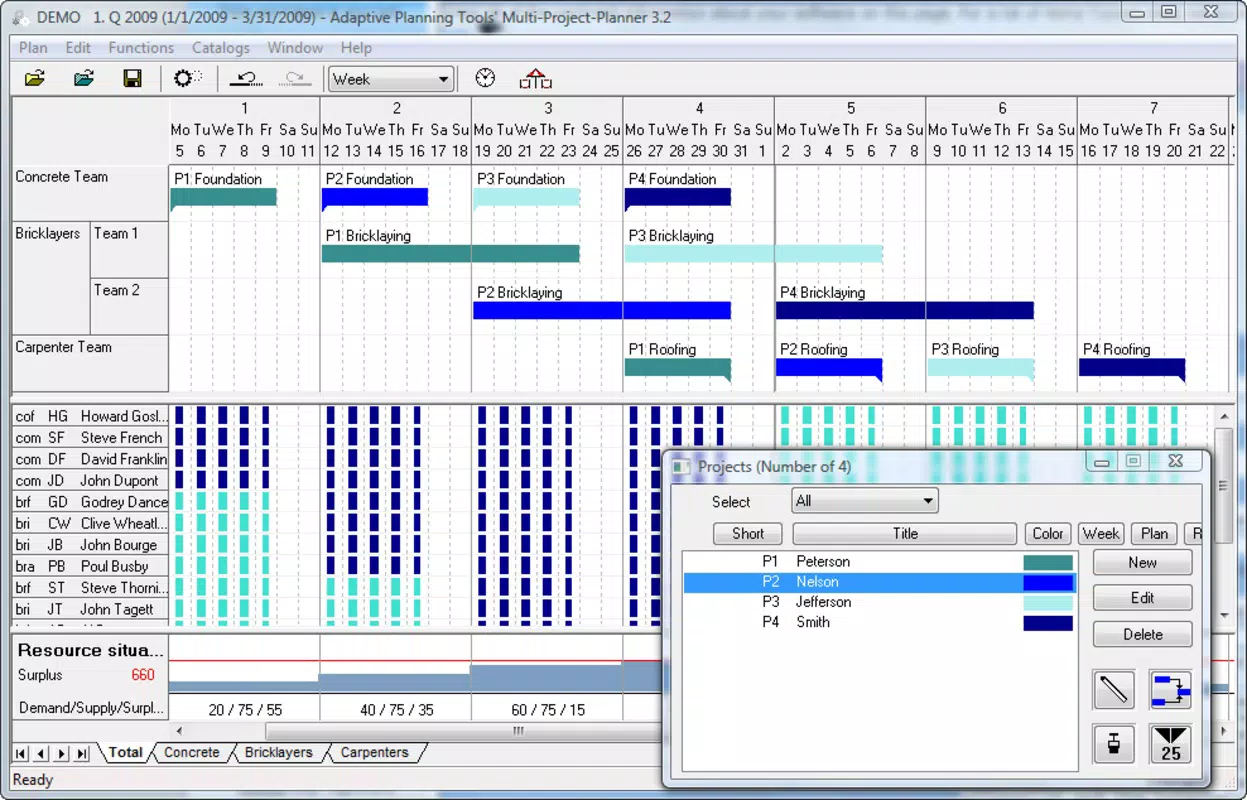
Multi Project Planner features a user-friendly interface designed to simplify complex project management tasks. The layout emphasizes clarity, with intuitive navigation between projects, tasks, and team members. Visual cues such as color-coded deadlines and progress bars enhance readability, allowing users to quickly assess project health at a glance.
Navigation is structured around a central dashboard that displays active projects, upcoming deadlines, and resource availability. Users can drill down into individual tasks, view assigned personnel, and update statuses with minimal taps. The app’s responsiveness appears consistent across device categories, though the developer did not list formal performance metrics.
Although the developer did not specify minimum OS requirements or detailed stability reports, the app’s long-standing availability suggests a stable foundation. The interface remains functional without excessive loading times, and transitions between screens are smooth. The inclusion of a video tutorial indicates a focus on usability, ensuring that users can adapt quickly even with limited prior experience.
Platform Compatibility & Technical Requirements
Multi Project Planner is available exclusively on the Android platform. The current version is 2.0, with a file size of 20.1 MB, making it a lightweight application suitable for most modern Android devices. The app is priced at $4.99, reflecting a mid-tier cost for productivity tools with specialized functionality.
The developer did not specify minimum OS requirements, compatibility with older versions, or hardware specifications. As such, users should verify device compatibility through official app store listings. The app’s size suggests it does not require extensive storage, which is beneficial for users with limited space.
Pros and Cons
Pros
- Streamlined project initiation using customizable templates
- Real-time progress tracking reduces manual reporting
- Conflict resolution system enhances resource efficiency
- Deadline-focused structure supports on-time delivery
- Comprehensive video tutorial improves user adoption
Cons
- Exclusive availability on Android limits cross-platform access
- Developer did not provide detailed technical specifications
- Price point may be high for casual users or individuals
- No information on cloud sync or data backup features
- Compatibility with older Android versions was not disclosed
FAQ
Is Multi Project Planner available for iOS?
As of now, the app is only available on the Android platform. There is no official iOS version listed.
Can I use Multi Project Planner for personal projects?
Yes, while designed for team collaboration, the app’s task tracking and deadline features are suitable for managing personal workloads and long-term goals.
How often is the app updated?
The app was last updated on March 6, 2012. No information is available on current update frequency.
Is my data secure in Multi Project Planner?
The developer did not provide details about data encryption, cloud storage, or privacy policies. Users should exercise caution when entering sensitive project information.
Does the app support offline use?
Specific functionality for offline use was not disclosed. Users should check the app’s behavior in low-connectivity environments.
Final Thoughts
Multi Project Planner stands out as a dedicated tool for professionals managing multiple projects with tight deadlines and complex team dynamics. Its combination of automated progress tracking, conflict resolution, and deadline-oriented design offers tangible benefits for team leaders seeking efficiency and control. The inclusion of a video tutorial enhances accessibility, making it easier for new users to adopt without extensive training.
While the app’s exclusive Android availability and lack of updated technical details are notable limitations, its core functionality remains relevant for users who prioritize structured task management and real-time oversight. For project managers in industries requiring precise coordination, the app delivers a focused solution that balances simplicity with powerful features.
Download Multi Project Planner now


